Solution
Raise the [ISO speed] to use a fast shutter speed when you wish to reduce the effects of camera shake or avoid blurry subjects, or to turn the flash off when shooting in a dark area.
Caution
The following explanations are provided based on the assumption that the [Shooting Mode] is set to [Program AE] (

).
To set the [ISO Speed], it is necessary to set the [Shooting Mode] to one of the following modes.
- [Program AE] (), [Long Shutter] ( ) in [SCN] (
 )
)
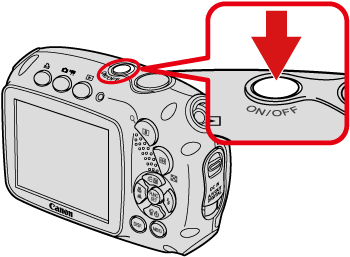
1. Press the ⋖Power⋗ button on the camera.
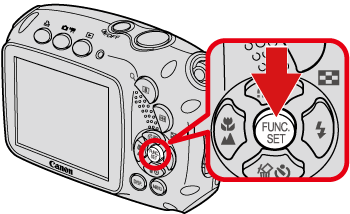
2. Press the ⋖FUNC./SET⋗ ( ) botton.
3. The following screen appears on the LCD monitor.
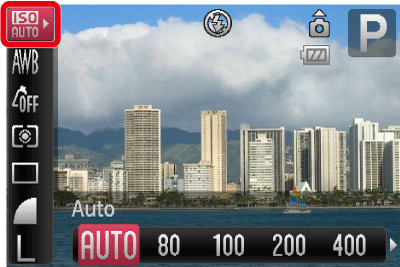
Operate the ⋖Directional buttons⋗ up and down to select [Auto] ( ).
).
4. Select the [ISO Speed].
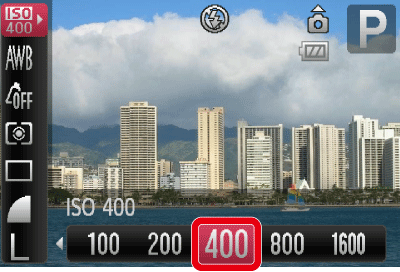
Operate the ⋖Directional buttons⋗ right and left to select the [ISO Speed]*.
After the settings are completed, press the ⋖FUNC./SET⋗ () button.
* The appropriate [ISO Speed] differs depending on shooting locations. If the camera shake warning icon ( ) appears when you press the ⋖Shutter Button⋗ halfway, it is recommended to gradually raise the ISO speed in increments such as [ISO 80], [ISO 100], etc., and then set the [ISO Speed] when the camera shake warning icon () disappears.
5. If the following icon is shown, the setting is complete (if setting [ISO Speed] to 400).
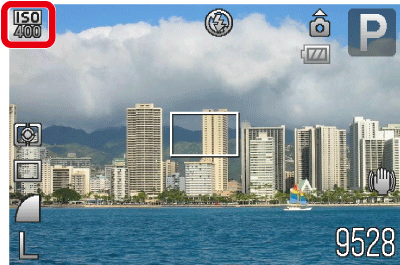
Caution
Raising the [ISO Speed] results in a faster shutter speed. Therefore, you can shoot images with less subject blur and camera shake.
However, the higher the [ISO Speed], the more the noise stands out (more uneven areas in an image).
Caution
With [ISO 3200], you can set an even faster speed.
How to set [ISO 3200] : Set the [Shooting Mode] to [SCN] (). Operate the ⋖Directional buttons⋗ up or down to select [ISO 3200] ( ) from the items displayed.
When the camera is set to [ISO 3200], Recording pixels are set to (

) (1600 x 1200 pixels).
When the camera is set to [ISO 3200], noise may stand out.

 Close
Close


