
 Close
Close


Solution
Caution
The ink level detector is mounted on the machine to detect the remaining ink level. The machine considers as ink is full when a new FINE Cartridge is installed, and then starts to detect a remaining ink level. If you install a used FINE Cartridge, the indicated ink level of it may not be correct. In such case, refer to the ink level information only as a guide.
You can check the current ink level by pressing the COPY button, the SCAN button, or the MEMORY CARD button. The LCD will display the ink level for a few seconds.
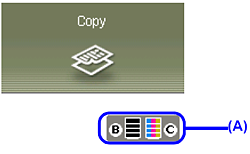
(A) Indicates the remaining ink volume.
When ink is low
 | Ink is low. You can continue printing for a while, but we recommend you to have a new ink tank available. |
When ink has run out
An error message may appear on the LCD while printing.
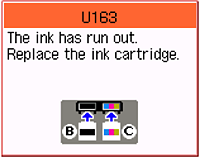 | Ink has run out. See [The ink has run out. Replace the ink cartridge. U163] in [ An Error Message Is Displayed on the LCD ] and take appropriate action. |