
 Close
Close


Solution
1. Holding the Camera2. When the Camera Shake Icon Appears
3. Image Is Blurred
4. No AF Frames Are Displayed And the Camera Does Not Focus
5. Shooting Conditions When the Camera May Have Difficulty Focusing
When an image is blurry or cannot be brought into focus during shooting, try to switch to [ 
1. Holding the Camera
You can prevent camera shake by holding the camera firmly.
Keep your arms tight against your body while holding the camera firmly by the sides. Be sure that your fingers do not block the flash.
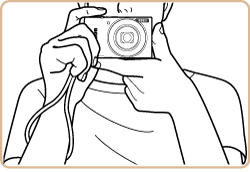
2. When the Camera Shake Icon Appears
When you press the [Shutter Button] halfway in low light conditions where camera shake is likely, a flashing ( 
 : On ].
Caution
When setting the flash mode to [On], make sure not to select one of the following shooting modes: [ 


This section explains the setting procedures when the camera's shooting mode is set to [Program AE: 
Turn the camera on.
Caution
If [Easy Auto enabled] message is displayed, follow the instructions on the screen to disable Easy Auto.
If you prefer, you can deactivate this message by changing the Easy Auto settings. For details, refer to "Related information" section at the end of the page.
Press the [ 
Press the [ 


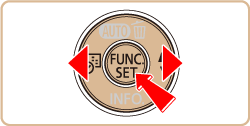
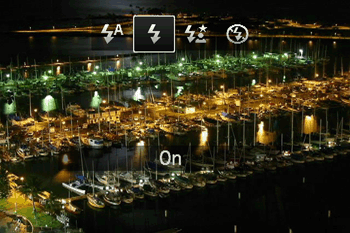
Caution
 ], [ Long Shutter :
  ].
].This section explains the setting procedures when the camera's shooting mode is set to [Program AE:
Turn the camera on.
Caution
If [Easy Auto enabled] message is displayed, follow the instructions on the screen to disable Easy Auto.
If you prefer, you can deactivate this message by changing the Easy Auto settings. For details, refer to "Related information" section at the end of the page.
Press the [
Press the [ 
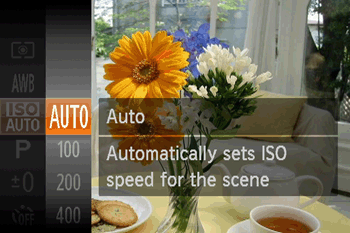
Mount the camera on a tripod or take other measures to keep it still.
3. Image Is Blurred
Caution
 ] and then choosing [Off].
If you prefer, you can deactivate this message by changing the Easy Auto settings. For details, refer to "Related information" section at the end of the page.
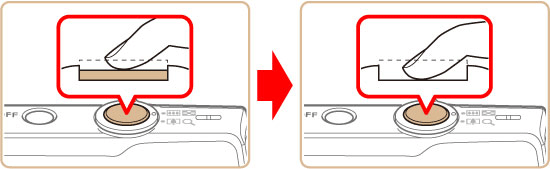
Half-press the shutter button (press lightly to focus), and then press it fully (without releasing the shutter button, press it all the way down).
Shooting Distances for Individual Focusing Ranges
| Focus Range | Maximum Wide Angle (  ) ) | Maximum Telephoto (  ) ) |
 | 5 cm (2.0 in.) - infinity | 1.3 m (4.3 ft.) - infinity |
 * * | 1 - 50 cm (0.4 in. - 1.6 ft.) | - |
 * * | 3.0 m (9.8 ft.) - infinity | 3.0 m (9.8 ft.) - infinity |
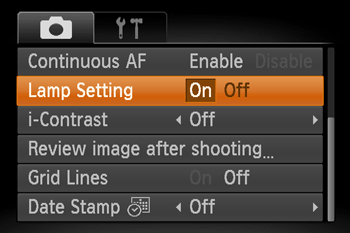
Press the [MENU] button, choose [Lamp Setting] on the [
Caution
If [Easy Auto enabled] message is displayed, follow the instructions on the screen to disable Easy Auto.
If you prefer, you can deactivate this message by changing the Easy Auto settings. For details, refer to "Related information" section at the end of the page.
Caution
] from the menu, if shooting mode is set to [ ], [ Face self-timer:  ], [ Fireworks: ]. ].
Turn the camera on.
Caution
If [Easy Auto enabled] message is displayed, follow the instructions on the screen to disable Easy Auto.
If you prefer, you can deactivate this message by changing the Easy Auto settings. For details, refer to "Related information" section at the end of the page.
Press the[
] button,choose [  ], and then choose a suitable [Focusing Range].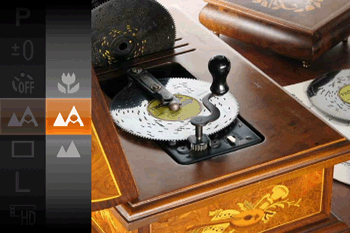
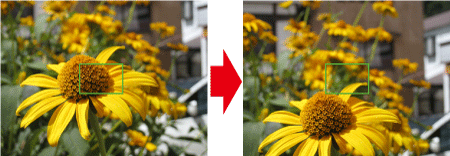
[Focus Lock]
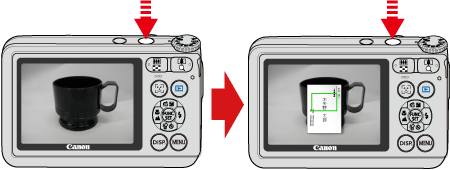
Aim the camera to capture the subject in an AF frame, and then hold the shutter button halfway down. As you continue to hold the shutter button halfway, recompose the shot as desired, and then press the shutter button all the way down.
4. No AF Frames Are Displayed And the Camera Does Not Focus
To have AF frames displayed and the camera focus correctly, try composing the shot with higher-contrast subject areas centered before you press the shutter button halfway. Otherwise, try pressing the shutter button halfway repeatedly.
Caution
The camera may not be able to focus in some conditions.
5. Shooting Conditions When the Camera May Have Difficulty Focusing
Examples of faces that cannot be detected:
- Subjects that are distant or extremely close
- Subjects that are dark or light
- Faces in profile, at an angle, or partly hidden
Note, that the camera may misinterpret non-human subjects as faces.
Tracking may not be possible when subjects are too small or move too rapidly, or when subject color or brightness matches that of the background too closely.
Focusing may not be possible in some shooting conditions.
- In low-light conditions, Servo AF may not be activated (AF frames may not turn blue) when you press the shutter button halfway. In this case, the focus and exposure are set according to the specified AF frame mode.
If the problem cannot be solved even after you checked all solutions above, the camera may be malfunctioning, so please contact Canon Customer support Help Desk.